
Redmi Note 12 Pro 5G is equipped with a MediaTek Dimensity 1080 processor, making this smartphone one of the best Redmi Note series devices. Users express their satisfaction with the performance and camera capabilities of this device. However, the operating system of a smartphone is also very important for users. Redmi Note 12 Pro 5G was launched with MIUI 14 based on Android 12, and now it will start receiving Android 13 update in EEA and India. * Firmware Detail: Region: China Branch: Stable Type: Fastboot OS: 13 Size: 6.7 GB URL: Download * MIUI 14 changelog: Highlights MIUI takes up less storage space now and keeps being swift and responsive over much more extended periods. Improved system architecture comprehensively boosts the performance of both pre-installed and third-party apps while saving power. Attention to detail redefines personalization and brings it to a new level. More than 30 scenes now support end-to-end privacy with no data stored in the cloud a...
Huawei Honor 4X Che2-L11 Android 6.0 Marshmallow update (C636B510) is now finally available in Asian Pacific countries like Malaysia, Lao, Sri Lanka, Nepal and Bangladesh too.

Don’t worry we are going to share step by step guide to safely Update your Huawei Honor 4X Che2-L11 to Marshmallows 6.0 B510 Firmware.
View my Flipboard Magazine.
÷ Prerequisites:
•Your Honor 4X Che2-L11 should be on Che2-L11C636B330 (Lollipop) without any mods.
*Disclaimer:
Android Custom ROM fix ® provide various Firmware Updates and Rooting process along with Custom ROM,Modes,file are all belong to their owners/developers. The autor of this site or the developers are not responsible, if you damage or brick your device.Do it on your own risk and follow the instruction properly.
* Important:
Backup important files stored on your device before proceeding with the steps below, so that in case something goes wrong you’ll have backup of all your important files.

÷ How to Update Huawei Honor 4X Che2-L11 to Marshmallows 6.0 B510 Firmware :
1- Download B510 Firmware & Unzip the firmware package.
2-Copy the dload folder folder to the external microSD card.
3- Back up your important data using Huawei’s app.
4- Turn your phone off.
5- Reboot by holding Vol up + Vol down + Power for a few seconds to start the upgrade.
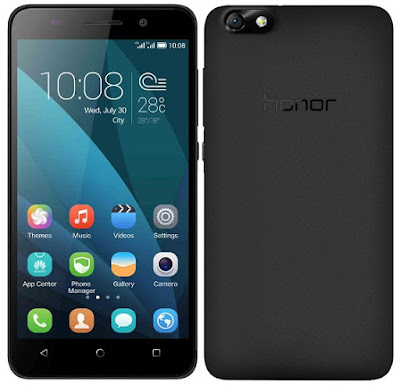
That’s it! Your Huawei Honor 4X Che2-L11should now have Marshmallow 6.0. B510 Firmware on your phone! Go to Settings > About phone to verify.
Like this post? PLZ Hit the share buttons below to share this article with your friends on Facebook, Google + and Twitter.
PLZ Follow Us On Flipboard 4 More Huawei Honor 4X Latest Updates.
PLZ Use the comment box below to contribute more ideas & Suggestions .
Best Regards.
÷ Firmware Details:
- Device: Huawei Honor 4X
- Model: Che2-L11
- Android: v5.1 Lollipop
- EMUI: 3.1
- Firmware: B330
- Build: Che2-L11C636B330
- Region: Asia Pacific
- Date: 25.10.2015
- Code: 05012WRS
- Status: Official Release
- Type: Full firmware image
- File Name: Che2-L11C636B330_Firmware_Myanmar_Hong Kong(China)_Bangladesh_Lao People’s Democratic Republic_Nepal_Viet Nam_Philippines_Channel-Others_Android 5.1_EMUI 3.1_05012WRS.zip
÷ Prerequisites:
•Your Honor 4X Che2-L11 should be on Che2-L11C636B330 (Lollipop) without any mods.
*Disclaimer:
Android Custom ROM fix ® provide various Firmware Updates and Rooting process along with Custom ROM,Modes,file are all belong to their owners/developers. The autor of this site or the developers are not responsible, if you damage or brick your device.Do it on your own risk and follow the instruction properly.
* Important:
Backup important files stored on your device before proceeding with the steps below, so that in case something goes wrong you’ll have backup of all your important files.

÷ How to Update Huawei Honor 4X Che2-L11 to Marshmallows 6.0 B510 Firmware :
1- Download B510 Firmware & Unzip the firmware package.
2-Copy the dload folder folder to the external microSD card.
3- Back up your important data using Huawei’s app.
4- Turn your phone off.
5- Reboot by holding Vol up + Vol down + Power for a few seconds to start the upgrade.

That’s it! Your Huawei Honor 4X Che2-L11should now have Marshmallow 6.0. B510 Firmware on your phone! Go to Settings > About phone to verify.
Like this post? PLZ Hit the share buttons below to share this article with your friends on Facebook, Google + and Twitter.
PLZ Follow Us On Flipboard 4 More Huawei Honor 4X Latest Updates.
PLZ Use the comment box below to contribute more ideas & Suggestions .
Best Regards.
Comments
Post a Comment